
In Horses of Hoofprint Bay, you can easily edit save files to alter your horse’s personality traits or tweak your in-game currency. Many players overlook this method, but it can significantly enhance your gameplay experience by giving you the customization options you desire. It’s vital to know where to find your save files and how to make these changes effectively.
The editing process involves a few simple steps, and once you get the hang of it, you can adjust horse personalities with just a few clicks. Be aware, however, that these modifications come with certain consequences, including disabling achievements and statistics for any edited save file.
Before jumping into the details, make sure to back up your save file. It’s an essential step to prevent potential issues down the line. You don’t want to lose your progress or face unexpected problems after editing!
How to Edit Horse Personalities in Horses of Hoofprint Bay Save Files
Editing your save file in Horses of Hoofprint Bay is a straightforward process. First, you’ll need to locate the appropriate save file, which is stored in a specific folder on your computer.
Once found, you can open it using Notepad to access and modify your horse’s personality traits with numerical values. This same file also contains the amount of money available for your stable.
Important Warnings Before Editing
Before making any changes, keep these crucial points in mind:
- Editing a save file disables achievements and statistics. If you’re aiming for achievements, keep that save file intact.
- Back up your save file. This step is critical when making any changes to the game’s files.
- This guide focuses only on editing existing personality traits. I’m not covering steps for adding new traits, as incorrect modifications could create issues.
While adding new traits might be possible by copying code from horses with existing traits, it’s a risk best avoided unless you’re experienced.
How to Find Your Save File
The first step is to locate the save folder for Horses of Hoofprint Bay. The most efficient method I’ve found is to use the Windows search bar.
- Type %appdata% in the Windows taskbar search and open the folder.
- In File Explorer, click AppData in the address bar to navigate back a folder.
- Open the LocalLow folder and look for ThogliStudios.
- Open Horses of Hoofprint Bay, then Saves~, and finally Games.
- Select the folder corresponding to the save game you wish to modify.
Alternative: Finding the Save Folder Manually
If you prefer, you can find the save folder manually using this path:
C:\Users\(your user)\AppData\LocalLow\ThogliStudios\Horses of Hoofprint Bay\Saves~\Games\(save file name)
Note: AppData is a hidden folder. If it doesn’t appear in File Explorer, go to View > Show > Hidden Items to enable it.
How to Edit Horse Personality Traits
Once you’re in the correct save folder, you’ll find several JSON files. Some of these are backups from earlier in the game, but the one you need is simply named save, without any numbers.
This file contains the information relevant to your current game session, and you can open it with a text editor like Notepad.
This is the file that affects my current game. I can open it using a text editor such as Notepad.
Finding the Horse I Want to Edit
To locate the horse you wish to modify, open the save file and press Ctrl + F. Enter the horse’s name in the search box and hit Enter.
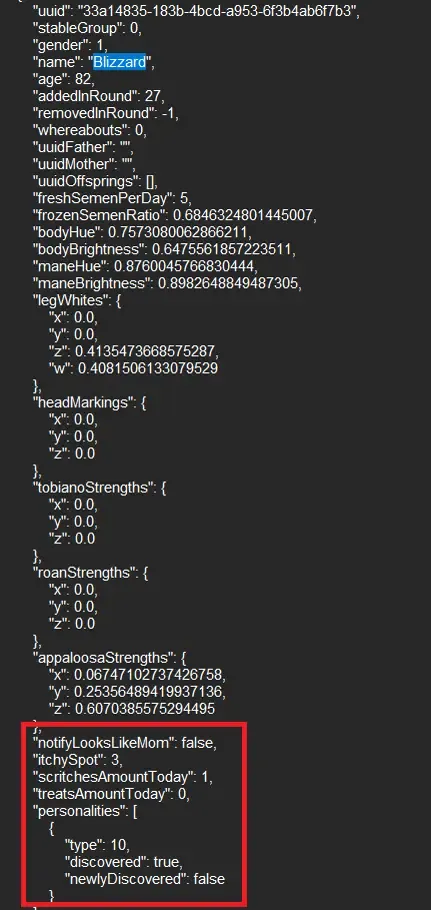
This will take you directly to that horse’s details in the file. Here, you’ll find various attributes, but for now, focus solely on the personality section.
Scroll until you see the personality entry. Pay attention to the value next to “type”, as that’s the one you’ll need to edit.
The specific number you need to adjust is right beside “type”.
Understanding Horse Personality IDs
The personality IDs can be somewhat perplexing since the numeric values in the save file don’t align perfectly with the positions of traits in the in-game Traits and Quirks menu.
Each personality is assigned a numerical ID that starts at 0, contrary to the trait’s position which begins at 1. This means you must enter a value one less than what is indicated in the Traits book.
For instance, the trait Good Inheritance is the 10th trait in the book but is represented as 9 in the file. If you mistakenly enter 10, you might accidentally select Bad Inheritance.
All Horse Personality IDs and Effects
All Horse Personality IDs and Effects
Here’s the full roster of horse personality IDs available for editing in Horses of Hoofprint Bay:
- 0 – Easy Keeper: Requires less food, gains 10 body condition, and loses weight slowly.
- 1 – Hard Keeper: Needs more food, loses 10 body condition, and loses weight quickly.
- 2 – Snacky: Gains extra confidence from treats.
- 3 – Cuddly: Gains extra confidence from scritches.
- 4 – Neat Freak: Starts each day cleaner with less dirt.
- 5 – Mud Lover: Starts with more dirt each day.
- 6 – Sure Footed: Reduced injury chances, can have abrasions in the field only.
- 7 – Injury Prone: Increased injury chances and may suffer serious injuries in the field.
- 8 – Good Mom: Foals start with better stats and confidence.
- 9 – Good Inheritance: Increases the likelihood of better stats in foals.
- 10 – Bad Inheritance: Increases the likelihood of worse stats in foals.
- 11 – Rebellious: May randomly change gait even with max confidence.
- 12 – Energetic: May attempt to speed up at maximum confidence, requires more exercise.
- 13 – Chill: May attempt to slow down at maximum confidence, needs less exercise.
Also, keep in mind that your starter horse will always be a mare with Sure Footed and Good Mom, traits that help reduce injury risks early on and make breeding easier.
Saving the Personality Changes
Once you’ve decided on the new personality, replace the number next to “type” with the ID from the list. After making the necessary edits, save the file in Notepad and then relaunch Horses of Hoofprint Bay. You should find that the horse now embodies the personality you selected.
Bonus: How to Edit Money in Horses of Hoofprint Bay
While you’re editing your save file, you can also modify the amount of money you have available. This is done within the same save file as the personality changes.
Finding and Changing the Money Value
To adjust your money, follow these steps:
- Open the save file in Notepad and press Ctrl + F.
- Search for money, then navigate down using the arrow key twice, starting from the top.
- Locate the money value just below the name of your stable.
- Change the amount to what you desire; adding a few zeros will significantly increase it.
- Save the file and exit. When you relaunch the game, you should see the updated amount.
What Happens After Editing a Save File?
After saving your changes and returning to the game, the edited save file will have a red ribbon on the selection screen. This indicates that any achievements and statistics have been disabled for that particular save. It’s crucial to weigh this trade-off before modifying emotions or finances. If you still want to earn achievements or track your progress, it’s best to refrain from editing that save file.
This is how you can edit horse personalities and adjust your money in Horses of Hoofprint Bay. Enjoy your time managing the ranch!
That’s the main trade-off I need to consider before changing personality traits or money. If I still want to earn achievements and track statistics normally, I should avoid editing that save file.
And that’s how I edit horse personalities and money in Horses of Hoofprint Bay. Happy ranching!